readTrail
A privacy-first Chrome reading companion that remembers exactly where you stopped reading.
Case study · Working MVP, built in public
The idea
readTrail helps people read long, text-heavy material in their browser without losing their place, their momentum, or the ideas they want to return to.
Why I wanted to build it
Dense text makes it easy to lose the current line, forget where you stopped, or abandon unfinished reading because returning takes too much effort. Most of that reading already happens in a browser, on a laptop or desktop.
How can a browser help people continue reading without turning their attention into another data stream?
- 1 Follow the text while actively reading.
- 2 Stop without worrying about losing the exact reading position.
- 3 Return later and continue with minimal effort.
Product philosophy
- Reading comes first
- Quiet and lightweight. It supports attention without becoming another interface the reader has to manage.
- The browser is the natural home
- Built into the environment where the reading already happens, not a separate reading app.
- Use is intentional
- Opt-in per page. No reading state is collected before the reader activates it.
- Memory should be trustworthy
- When it says it remembers a position, the reader can rely on it. Saved state survives looking elsewhere.
- Privacy is part of the product
- Reading history reveals sensitive interests. Collect the minimum, store locally by default, make saving explicit.
- Grow from position to understanding
- Exact position is the foundation. Knowledge capture is a future layer, not an excuse to weaken the initial experience.
What it is not: A decorative cursor effect, An automatic surveillance log of browsing activity, A read-it-later dumping ground with no sense of position, A productivity dashboard that judges how much someone reads, An AI summarizer by default.
Fig. 2Activate, follow, pause, save, leave, come back.
- 1Activate
Turn readTrail on for this exact page from the popup. The UI warns that page clicks will be reserved for reading lock.
- 2Follow
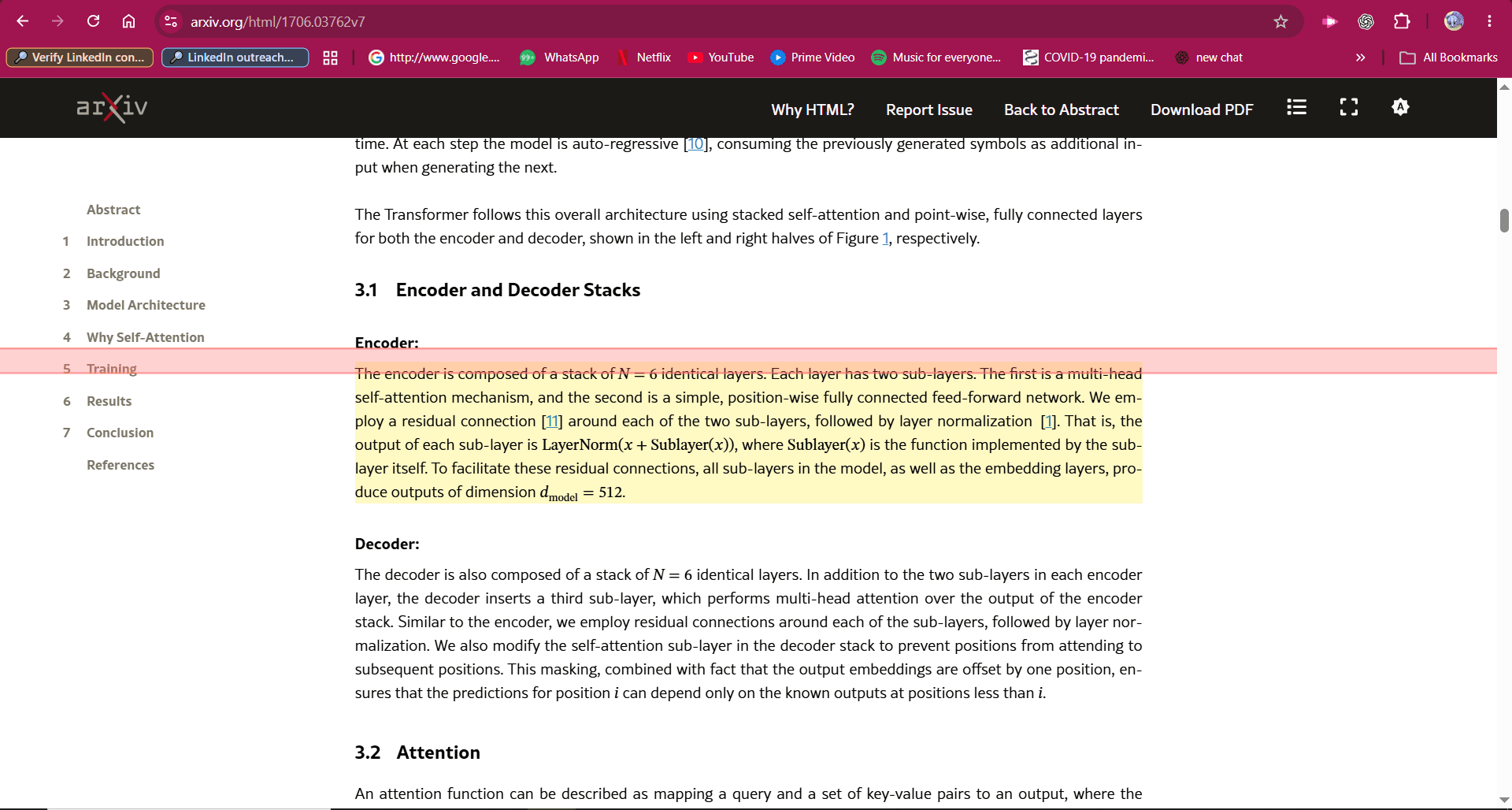
A light, translucent guide tracks the current readable line as you move.
- 3Pause
A single click freezes the marker on a line, anchored to the text so it stays attached while scrolling. Click again to resume.
- 4Save for later
An explicit action in the popup. One durable resume point per exact URL. Unsaved progress stays temporary.
- 5Close Chrome
Temporary state expires with the session. Saved checkpoints survive a restart.
- 6Continue reading
Reading Space lists saved pages. Continue reading opens the page, activates reading lock and restores the saved position.
Light, translucent guide. Responsive but quiet, respects reduced motion.
Stronger fixed treatment for the temporary checkpoint, aligned to the visual centre of the line.
Warm-gold treatment for a deliberate saved checkpoint. Distinguishable without relying on colour alone.
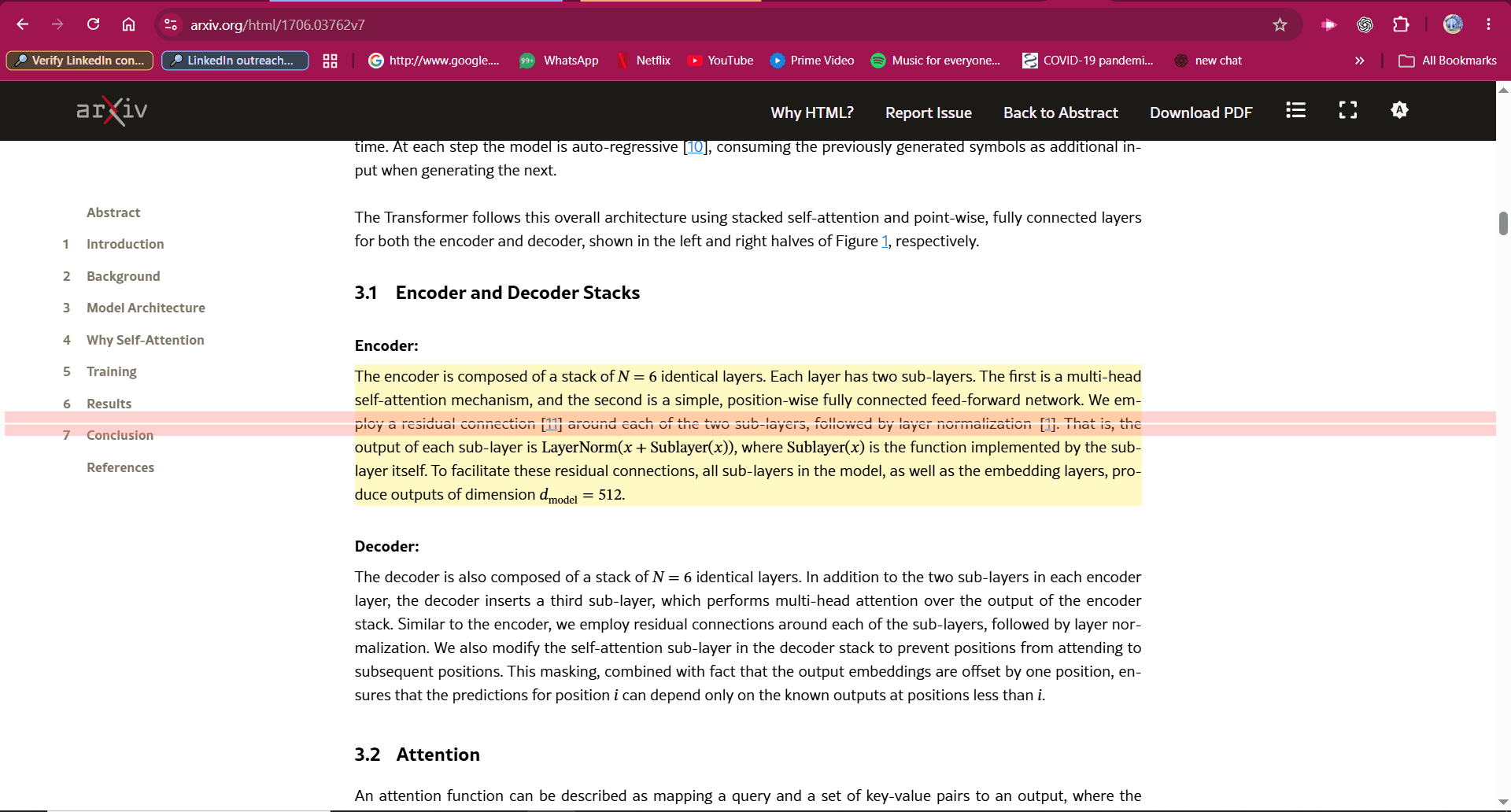
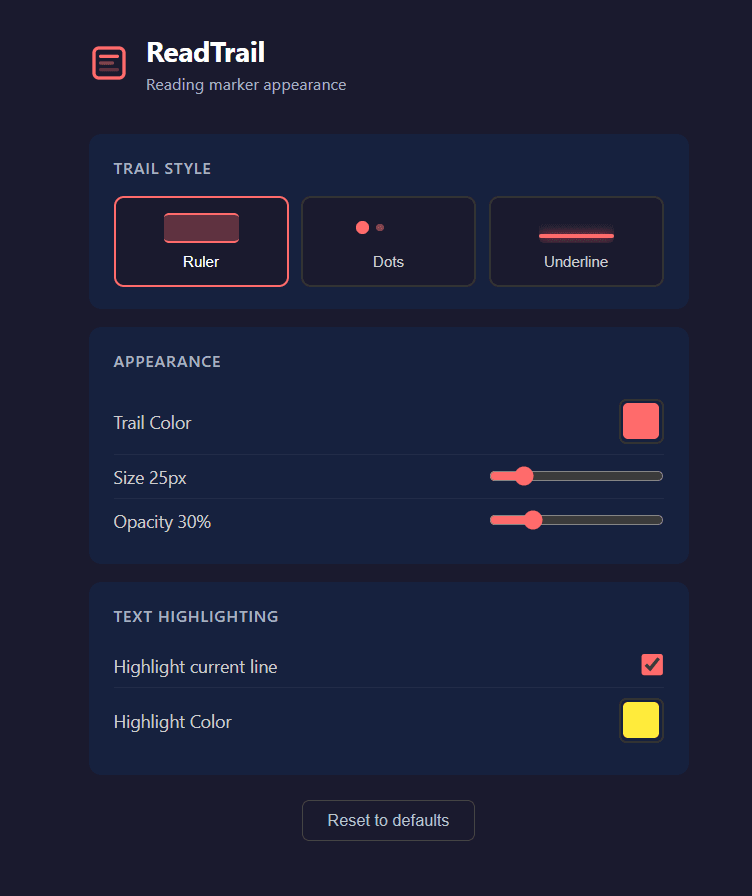
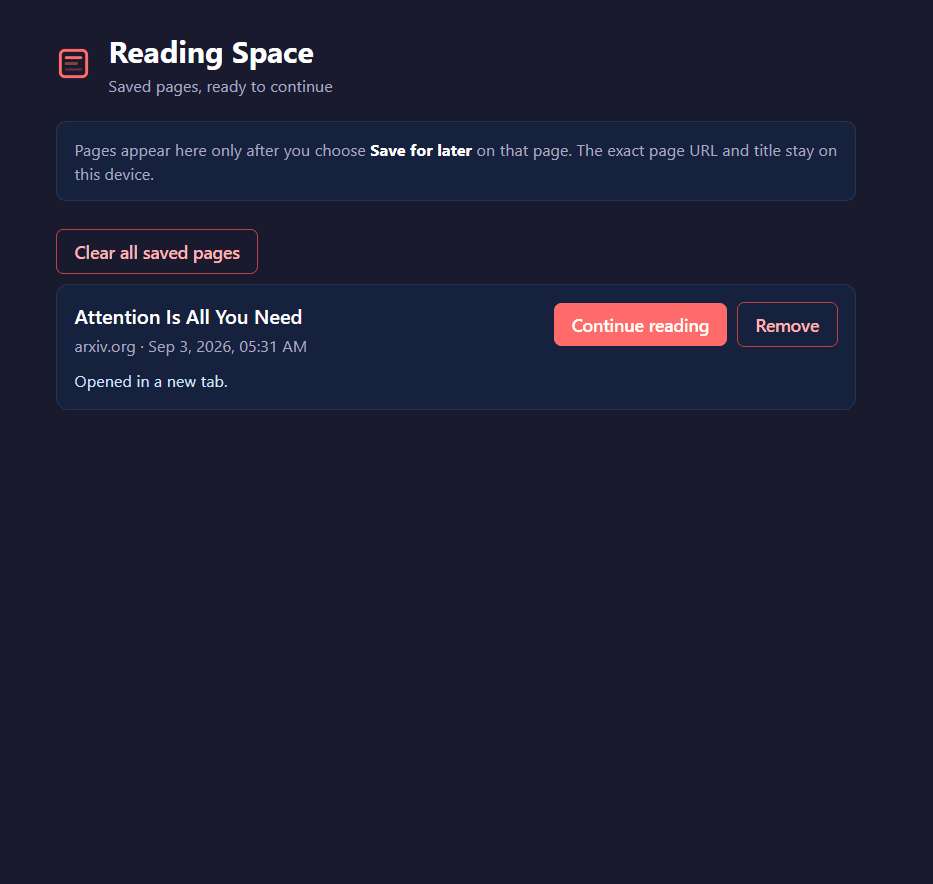
Table 1Decisions, and what they cost.
| Decision | Tradeoff accepted |
|---|---|
| Opt-in per page, dormant by default | Less convenient than always-on, but a dormant page creates no canvas, pointer listener, anchor lookup or reading-state write. Privacy is enforced structurally, not by policy. |
| Active readTrail is an explicit reading lock | Primary clicks pause or resume instead of activating links and buttons. Scrolling and text selection stay available. Reading loses some page interactivity, but the pause gesture works even on linked text. |
| One automatic position, many intentional bookmarks | Keeps the mental model simple: the trail remembers where you stopped; you decide what is worth marking. Bookmarks are deferred to a later sprint. |
| Permanent saving is a separate decision | Temporary progress never silently becomes history. Saving is an explicit 'Save for later' action; the popup shows when temporary progress is newer than the saved point. |
| Turning off hides, never deletes | Readers can leave and come back without fear. Session anchors persist even when the UI is off. |
| Store only what restores a position | No passage text, page content, selections, analytics identifiers or browsing log. Title and URL become durable only because the reader explicitly saved that page. |
| Document planned work separately from shipped work | The README's roadmap is explicitly 'planned work, not completed claims'. Slower-looking, but honest. |
- q1Still open: What is the simplest activation gesture that feels native to the browser?
- q2Still open: How precise must restoration be when a page changes between visits?
- q3Still open: When does an unfinished item become completed?
- q4Still open: What does 'contributed to my knowledge' mean from the reader's point of view?
Fig. 6Technical architecture
- Chrome Extension (Manifest V3)
- Plain JavaScript, HTML, CSS
- Canvas overlay for the trail
- chrome.storage.session for temporary state
- chrome.storage.local for preferences and saved pages
- Vitest + JSDOM (128 behavioral tests)
storageactiveTabreadtrail.saved.v1:<exactUrl> = { version, title, position: { anchor, viewportOffset, scrollY, scrollRatio, savedAt }, savedAt }- 1
background/service-worker.jsOwns extension state and validates every runtime message and stored record at the trust boundary. Handles persist, list, remove, clear and continue for saved resume points.
- 2
content/position.jsPosition detection: finds the readable line and builds a DOM anchor (path, index, offset) plus viewport offset, scrollY and scroll ratio.
- 3
content/renderer.jsCanvas rendering of following, paused and saved trail states with configurable style, colour, size, opacity and highlighting.
- 4
content/content.jsPage lifecycle and interaction: activation, reading lock, click and double-click handling, restoration.
- 5
popup/Current-page controls: activate, Save for later, Update saved position, open Reading Space.
- 6
options/Global appearance preferences.
- 7
reading-space/Extension-owned page listing saved pages with Continue reading, Remove and Clear all.
- 1Temporary state and durable state live in different storage areas, behind the same validated message boundary.
- 2Saving snapshots the active content script's in-memory position, never the URL-keyed shared session record, because two tabs can share the same URL.
- 3Save messages must be tab-bound and their sender URL must match the saved URL; incognito, oversized and malformed input is rejected.
- 4Anchor validation caps depth, index and offset so malformed local data fails safely.
Where AI fits
Nowhere yet, deliberately. The product vision lists an AI summarizer as something readTrail is not by default, and the active sprint names knowledge graphs, recommendations and summaries as non-goals. The directional 'knowledge' layer (helping readers see what a page contributed to what they already know) is undecided in interaction model and data model, and is only allowed to arrive once reliable reading memory exists.
Built with a small, review-led agent workflow: Priyanshu owns product vision and resolves product questions; a lead engineering agent converts outcomes into sprint scope, delegates bounded tasks and reviews every diff; a bounded worker agent implements one task at a time and cannot commit, change scope or edit the vision. Sprint documents carry goals, non-goals, acceptance criteria and a manual Chrome verification record.
Works today
- ✓Visual reading guide following the current line
- ✓Anchored paused marker that stays attached while scrolling
- ✓Configurable trail style, colour, size, opacity and highlighting
- ✓Explicit per-page activation with reading-lock warning
- ✓Explicit Save for later, one durable resume point per exact URL
- ✓Private Reading Space with Continue reading, Remove and Clear all
- ✓Session restoration to the exact position on unchanged pages
- ✓Local-only settings and data: no account, analytics or page-text collection
- ✓128 automated behavioral tests
Roadmap (planned, not claimed)
- ○More resilient restoration when a page's structure changes significantly
- ○Optional save prompt when closing a tab with unsaved progress
- ○Multiple intentional bookmarks per page
- ○Reflection: preserving selected passages, reactions or questions when explicitly chosen
- ○Knowledge connections built on top of reliable reading memory (directional, undecided)
What it says, without saying it
Product thinking: decisions, non-goals and open questions are written down and separated UX judgment: three visually distinct states, reduced-motion and keyboard support System design: trust boundaries, storage separation, fail-safe validation Curiosity: a real problem from his own reading habit Thinking beyond implementation: privacy as architecture, not a checkbox
Related tracks: Builder, Product · see Fig. 2